Choose a school year
The school year starts on 1 September and ends on 31 August.
Automatic year
Automatico follows the school year that contains today's date. If that year has no data, the card uses the latest year that ClasseViva provides.
Select another year
The year menu appears when the card can use more than one year. Select an available year, such as 25/26. The selection stays in the browser.
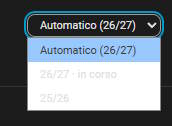
The card can load another year when you select it. It uses the existing login and keeps the data in cache for 30 minutes. The first load of an old year can take a few seconds.
Use one of these formats in configuration:
25/262025/202625for a school year that starts in 2025
Set a fixed year on one card
Set anno_scolastico to the year that the card must use. Set selettore_anno to false to hide the year menu:
type: custom:cvv-dashboard-card
account: student_one
anno_scolastico: "25/26"
selettore_anno: false
Keep the selector enabled if you want to change the year in the card.
Multiple students
The year selection in the full-screen student panel applies to all students in that browser. Add a separate integration entry for an account and year only when you need its sensors and calendars to stay separate.